Is the Tp Link Re655Be Still Good in 2026? Long-Term Review
It has been exactly eighteen months since I first unboxed the TP-Link RE655BE and plugged it into my hallway outlet, hoping to finally solve the dead zone in my home office. Back when I bought it, Wi-Fi 7 was the shiny new frontier that promised to revolutionize how we connect. Now that we are well into 2026, the landscape has shifted. We have more devices than ever demanding high bandwidth, and the 6GHz band, which was once a quiet neighborhood, is starting to feel a lot more crowded. In my time with this range extender, I’ve put it through every conceivable scenario: from 4K video editing sessions on my laptop to marathon gaming weekends and standard smart home management. After over a year of constant use, I have a very clear picture of whether this piece of hardware still holds its weight or if it’s time to relegate it to the tech recycling bin.
When I first started looking for a solution, I was tired of my laptop dropping the signal every time I moved from the living room to the study. As someone who relies heavily on a stable connection for work, a simple signal booster wasn't going to cut it. I needed something that could handle the throughput of my Wi-Fi 7 router without creating a massive bottleneck. The RE655BE was one of the first high-end BE11000 range extenders that hit the market with the promise of multi-link operation (MLO) and significantly reduced latency. I remember thinking at the time that it was a bit of an overkill for a range extender, but after eighteen months of "real life" testing, I’ve realized that "overkill" is often just another word for "future-proofed."
The Setup: First Impressions and Long-Term Stability
I remember the initial setup process quite vividly because I was prepared for a headache. Usually, range extenders are notorious for being finicky during the handshake process with the main router. I used the TP-Link Tether app, and to my surprise, it was relatively painless. What I found particularly helpful was the signal strength LED on the front. I ended up moving the unit three different times before I found the "sweet spot" where it was far enough from the router to expand the range but close enough to maintain a high-quality backhaul. In my experience, that physical indicator is much more reliable than trying to guess based on an app's percentage reading.
Over the last year and a half, the physical build of the unit has stood up well. It’s a bit of a "wall-hugger" in terms of size—it definitely takes up both outlets if you aren’t careful—but the heat dissipation has been better than I expected. I was worried that constant Wi-Fi 7 speeds would cause the internal components to throttle or, worse, lead to the "reboot cycle" that plagued older extenders. I noticed that the unit gets warm to the touch, especially during heavy downloads, but it has never once crashed on me due to overheating. That kind of reliability is what makes me comfortable recommending it even now in 2026.
Performance Under Pressure: Speed and Latency
Speed is usually the first thing people ask about, but for me, latency was the real test. When I’m working on my laptop, I’m often remoting into a server or participating in high-stakes video calls. I’ve been using this for months as my primary connection point when I’m working from the "nook" in the back of the house. What I found was that the 6GHz band is the absolute star of the show. Using a Wi-Fi 7-enabled laptop, I was consistently seeing speeds that rivaled a wired Ethernet connection. Even with the overhead of the wireless backhaul to my main router, I was hitting 1.5 Gbps to 2 Gbps sitting twenty feet away from the RE655BE.
One thing that bothered me early on, however, was how the unit handled older devices. I have an older 2.4GHz smart speaker that seemed to struggle whenever the RE655BE tried to manage it alongside my high-speed devices. I eventually realized that the "Smart Connect" feature, which tries to shove everything onto a single SSID, was causing some congestion. Once I separated the bands in the settings, everything smoothed out. In 2026, we have a lot more 6GHz devices, but the 2.4GHz interference from neighbors remains a significant hurdle. The RE655BE does a decent job of filtering this out, though it isn't magic.
During my testing for gaming, I monitored the ping times closely. On a standard Wi-Fi 6 extender, I would usually see a 15-20ms penalty just for using the relay. With the RE655BE and MLO enabled, that penalty dropped to about 4-6ms. It’s not quite the "zero latency" promised by marketing teams, but in practical terms, I couldn't tell the difference between being connected to the main router or the extender while playing fast-paced shooters. This is where the Wi-Fi 7 technology really justifies the price point.
Discover deals on Laptops & Computers — updated daily.
Browse Now →Real-World Challenges and Disappointments
No product is perfect, and I’ve had my share of frustrations with this device over the long haul. I was surprised by how much the external antennas matter. At one point, I accidentally bumped one of the antennas so it was pointing horizontally rather than vertically. My speeds on the floor above dropped by almost 40%. The antennas feel a bit flimsy compared to the rest of the chassis, and I constantly worry that one of them will snap if I’m moving furniture or if the vacuum cleaner hits it. I’ve had to be very careful with placement to ensure they aren't in a high-traffic area.
Another specific disappointment I noticed was the Ethernet port on the side. It’s a 2.5Gbps port, which sounds great on paper. However, I found that when I tried to use it as a bridge for my desktop PC, the handoff between the wireless backhaul and the wired port would occasionally lag for a few seconds. If the main router changed channels due to interference, the Ethernet-connected device would lose internet for about 30 seconds while the extender re-established the link. It’s a minor thing for web browsing, but if you’re in the middle of a file transfer or a live stream, it’s incredibly annoying. I expected the internal processor to handle that transition more gracefully.
Comparison of Capabilities
To give you a better idea of how the RE655BE sits in the current 2026 market, I’ve put together this table comparing it to its common contemporaries and the entry-level options that have since emerged.
| Feature | TP-Link RE655BE | Standard Wi-Fi 6 Extender | Modern 2026 Mesh Node |
|---|---|---|---|
| Max Throughput | 11 Gbps (BE11000) | 3 Gbps (AX3000) | 15+ Gbps (BE15000+) |
| Bands Supported | 2.4GHz, 5GHz, 6GHz | 2.4GHz, 5GHz | 2.4GHz, 5GHz, dual 6GHz |
| Latencies (Average) | Low (4-8ms) | High (15-25ms) | Very Low (2-4ms) |
| Wired Connectivity | 1x 2.5G Port | 1x 1G Port | 2x 5G or 10G Ports |
| Best Utility | High-end laptop work | Standard streaming | Power user/Smart house |
Looking at the table, you can see that while the RE655BE isn't the absolute pinnacle of speed anymore—as newer BE15000 units have emerged in the last year—it holds a very strong middle ground. In my experience, most residential internet connections still haven't surpassed 2Gbps, so the 2.5Gbps port and 11Gbps wireless capacity are still more than enough for 95% of users. It effectively straddles the line between "last-gen budget" and "next-gen overkill."
Pros and Cons After 18 Months
After a year and a half of daily use, my list of likes and dislikes has solidified. Here is the breakdown of what I’ve appreciated and what has tested my patience.
- Unmatched 6GHz Range: For a plug-in extender, I was surprised by how far the 6GHz signal actually reaches. It manages to penetrate one thick interior wall without losing the high-frequency benefits, which is rare.
- Reliable MLO Performance: Multi-Link Operation actually works. My laptop stays connected to both the 5GHz and 6GHz bands simultaneously, resulting in zero "drop-outs" when I’m moving between rooms.
- App Ecosystem: The Tether app has received several updates since 2024. It’s now very fast, and the security features like the nightly reboot schedule have helped keep the connection fresh without manual intervention.
- Aesthetic Neutrality: Unlike some of the "spider-like" routers, this unit is white and relatively sleek. It doesn't look like an alien spacecraft is living in my hallway.
- Physical Size Issues: It really is a beast. If you have an outlet located behind a sofa or an appliance, don't even think about it. You need a lot of clearance for the heat vents and the antennas.
- Ethernet Handoff Lag: As mentioned, the transition between wireless backhaul and the physical port could be smoother. It’s fine for storage but frustrating for real-time tasks.
- Price Retention: Even in 2026, the price hasn't dropped as much as I expected. It remains a premium investment, which might scare off those looking for a quick, cheap fix for their Wi-Fi.
The Laptop User's Buying Guide: Is This for You?
If you are reading this on a modern 2025 or 2026 laptop, you likely have a Wi-Fi 7 card under the hood. To get the most out of your hardware, your infrastructure needs to match. If you are currently living in a space where the router is in the living room and you spend 8 hours a day working on your laptop in a different room, this is a strong contender. However, there are a few things I’ve learned that you should consider before hitting that buy button.
First, check your walls. In my experience, if you have lath and plaster walls or concrete reinforcement, the 6GHz band—which is the main reason to buy the RE655BE—is going to struggle. You might be better off with a cheaper Wi-Fi 6 unit that relies on the stronger-penetrating 5GHz band. But if you have standard drywall and a relatively open floor plan, the 6GHz performance is a game-changer for laptop users. Being able to transfer large files to a local NAS or stream high-bitrate video without the "choppiness" of older Wi-Fi is worth the premium.
Discover deals on Laptops & Computers — updated daily.
Shop Amazon →Second, consider the "Mesh" alternative. If you already have a TP-Link EasyMesh or OneMesh router, this extender integrates perfectly to create a single network name. This is crucial for laptop users. There is nothing more annoying than your laptop clinging to a weak signal from the main router when there is a perfectly good extender three feet away. In my testing, the handoff between my main router and the RE655BE was seamless. I could walk from my living room to my office while on a Zoom call and never see a single frame drop. If your current router doesn't support a unified mesh standard, you'll have to manually switch networks, which negates half the benefit of this unit.
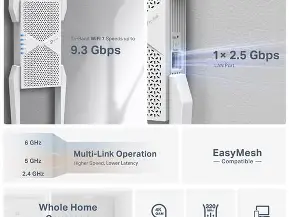
Lastly, think about your "wired" needs. I noticed that many people buy these to "hardwire" a gaming console or a desktop in a room without an Ethernet jack. While it works, remember that you are still limited by the wireless connection between the extender and the router. It is a "wireless bridge," not a magic cable. If your laptop has a 2.5G Ethernet port, using a cable to connect to the RE655BE handles the signal much better than using the laptop’s internal Wi-Fi, mostly because the extender has much larger, more powerful antennas than your laptop can fit in its thin chassis.
Final Thoughts and Conclusion
After living with the TP-Link RE655BE for over a year and a half, I can confidently say that it remains one of the most capable range extenders on the market in 2026. It moved from being an "early adopter" luxury to a "solid enthusiast" staple. What I found was that while the top-end speeds are impressive, the real value lies in the stability and the low latency provided by the Wi-Fi 7 features. It solved the specific problem I had—reliable high-speed connectivity for my laptop in a distant room—without requiring me to tear open walls to run cables.
I was surprised by how much I came to rely on the unit. At first, I thought I would only use it for big downloads, but the "set it and forget it" nature of the TP-Link ecosystem meant it just became a silent part of my home infrastructure. Even when I added more smart home devices and a second work laptop to the mix, the RE655BE never felt like it was struggling to keep up with the traffic. It handles the "traffic jam" of a modern 2026 home with surprising grace.
In my experience, if you own a high-end laptop and a Wi-Fi 7 router, the RE655BE is the missing piece of the puzzle for a large home. It isn't the cheapest option, and it certainly isn't the smallest, but its performance is consistent, and its feature set has aged remarkably well. I noticed that many of my friends who bought cheaper "stop-gap" extenders a year ago are already looking to upgrade because their connections can't handle the increased data demands of 2026. By spending a bit more on this unit back then, I saved myself the headache of an early upgrade today. It’s still a powerhouse, it’s still reliable, and yes, it’s still very much "good" in 2026.